
Now that you understand how to view and search for different types of orders, let’s discuss how to export them from WebManager.
➡️ Login to WebManager and on the left sidebar go to: Orders > Export Order
⚠️ Important: You can currently export only about 100 orders at a time (depending on the number of line items). If you need to export 101+ orders, you’ll need to export in batches.
🛳️ Export Options
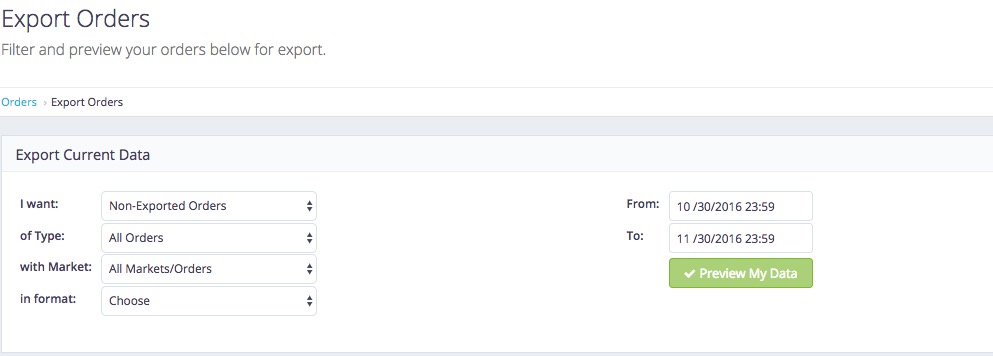
The Export Current Data screen has four dropdown menus for you to choose from:
-
I Want 📝
Non-Exported Orders → exports only the orders that have not yet been extracted.
All Orders → exports every submitted order within your specified time span.
-
Type 📑
Choose which kind of order to export (e.g., Quote, Voided).
Or select All Orders to include everything.
-
Market 🌎
Choose All Markets or a specific market for exporting orders.
-
Format 📂
Select the export format you need (e.g., QuickBooks, Sage, and more).
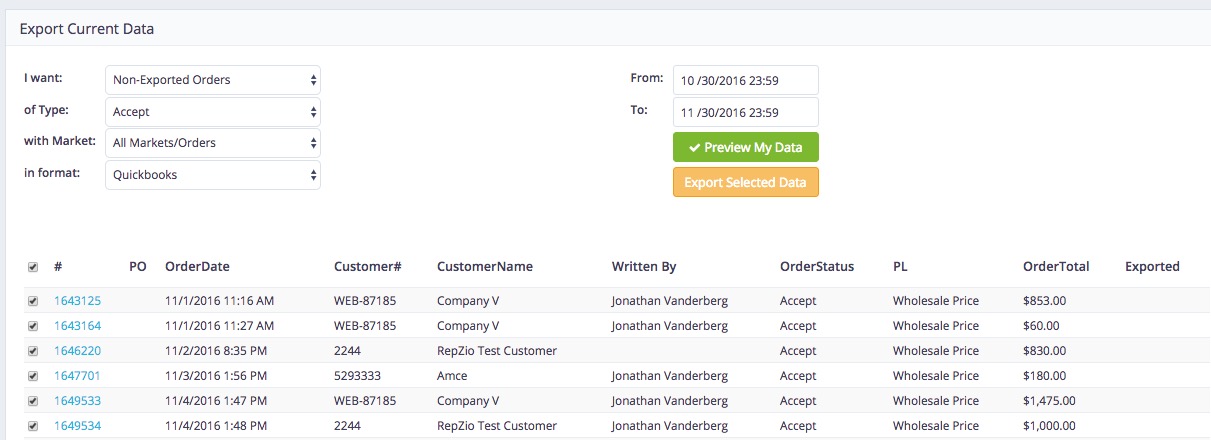
Preview & Export ✅
Click the green Preview My Data icon 👀 to review your selection.
Once satisfied, click the Export Selected Data icon 📤.
Your orders will export in the format you selected earlier.
❓ FREQUENTLY ASKED QUESTIONS (FAQS)
Q. Why can’t I export more than 100 orders at once?
A. ⚠️ The system limits exports to around 100 orders (depending on line items) to prevent errors and performance issues. For larger exports, run them in batches.
Q. What’s the difference between “Non-Exported Orders” and “All Orders”?
A. Non-Exported Orders are those that have not yet been downloaded. All Orders includes every submitted order within your selected timeframe.
Q. What export format should I choose?
A. This depends on your accounting or reporting system. For example, choose QuickBooks if you use QuickBooks, or Sage if you use Sage. If unsure, check with your finance/accounting team.
Q. Can I re-export an order that was already exported?
A. Yes, select All Orders instead of Non-Exported Orders if you need to re-export previously downloaded orders.
Q. My export file looks incomplete or is missing data—what should I do?
A. Try reducing the number of orders in your batch. If the issue continues, confirm you selected the correct export format.